Contact us
Phone: +49 811-99881-0
E-mail:
-
support@baltech.de
to get personal support - sales@baltech.de
to place an order and for order-related questions
What to check before opening a support case
Mobile ID
Check uptime status (Cloud version)
Mobile ID Manager uptime status:

In case of uptime issues, be assured they're already taken care of.
Send in app log
If the reader doesn't respond to phones, ask affected users to send a support request from their Mobile ID apps to support@baltech.de. These requests contain an app log that helps us troubleshoot the issue.
In addition, we still require an official support request from an admin to take action.
ToolSuite or Card Formatter
Make sure you use the latest version and check for a workaround here:
SDK
Make sure you use the latest version.
What we'll need to help you
Reader details
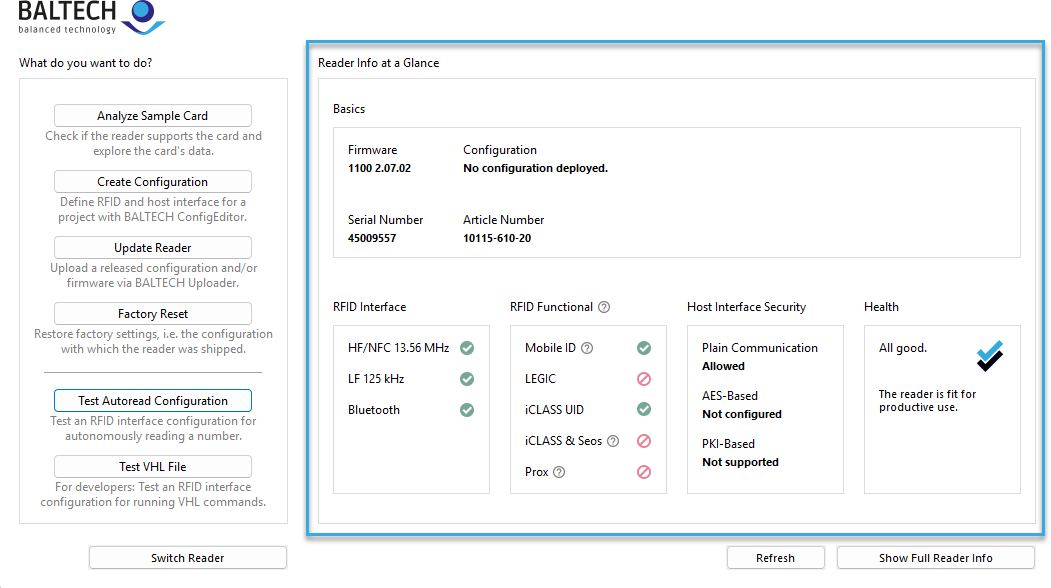
Connect the reader to ID-engine Explorer and send us a screenshot of the reader information displayed as well as the ToolSuite version you're using.
Returning a reader
To return a reader with hardware issues, please use our RMA form.
BALTECH SDK
Please send us
- a code sample
- the line that causes the issue
- the exact error pattern
Mobile ID
For issues with the Mobile ID app, please forward us the user's support request including log file.
Mobile ID SDK
Please send us
- SDK version (check
SdkBuildConfig.sdkVersion) - Platform (Android/iOS) and version
- Device model
- Logs (via
sendLogs())
Before contacting
- Review app note examples
- Enable debug mode and check console logs
- Try on different device if possible
Configuration
Your order options and the details we'll need from you are listed here.
The service fee is €300 per order.
Job file for Card Formatter
To create a job file, we'll need the information listed here.
The service fee is €500 per job file. For MIFARE DESFire cards purchased from us, this fee is waived if you order a BALTECH standard card structure.