BALTECH standard card structure
This applies to MIFARE DESFire cards only.
The BALTECH standard card structure is a ready-made card layout optimized for access control. It covers many common applications and follows security best practices.
If you don't have special requirements regarding the card structure, we recommend you order a job file with the BALTECH standard card structure.
This page documents the card structure so that, together with the keys provided by BALTECH, you can configure your reader to read the programmed card number (PCN).
Overview
The card structure includes the following components:
| Component | Purpose |
|---|---|
| PICC-level settings | Card-level encryption and master keys |
| Application 1 | Access control with non-diversified keys |
| Application 2 | Access control with diversified keys (higher security) |
| Application 3 | Reserved for future applications |
PICC-level settings
The card itself is configured with the following security settings:
- AES encryption for all communication
- PICC master key (Key 0) for card-level administration
- EV2 DAM keys (Keys 1–3) for Delegated Application Management (authentication, MAC, and encryption)
- Creation of new applications is only possible following prior authentication with the PICC master key.
All PICC-level keys are set to project-specific values by BALTECH.
Application 1 – access control (non-diversified keys)
AID: Project-specific, provided by BALTECH.
This application stores the Card ID in 5 separate files, each protected by its own key pair. This allows you to grant different users or systems access to the same Card ID independently.
File structure
Each of the 5 files is a standard data file containing the Card ID in 3 encodings:
| Encoding | Description |
|---|---|
| BCD | 5 bytes, binary-coded decimal |
| ASCII | 10 bytes, human-readable text |
| Binary | 5 bytes, raw binary |
The remaining 12 bytes per file are filled with random data for additional security.
Key assignments
| Key | Role | Description |
|---|---|---|
| Key 0 | Application master key | Full application access |
| Key 1 | Change key | Allows changing other keys |
| Key 2 | Rolling key | Used internally |
| Key 3 | Read key (File 0) | Read access to Card ID |
| Key 4 | Read/write key (File 0) | Read and write access to Card ID |
| Key 5 | Read key (File 1) | Read access for alternative user 1 |
| Key 6 | Read/write key (File 1) | Read and write access for alternative user 1 |
| Key 7 | Read key (File 2) | Read access for alternative user 2 |
| Key 8 | Read/write key (File 2) | Read and write access for alternative user 2 |
| Key 9 | Read key (File 3) | Read access for alternative user 3 |
| Key 10 | Read/write key (File 3) | Read and write access for alternative user 3 |
| Key 11 | Read key (File 4) | Read access for alternative user 4 |
| Key 12 | Read/write key (File 4) | Read and write access for alternative user 4 |
All key values are set per project by BALTECH. Creation and deletion of files within this application is disabled.
Application 2 – access control (diversified keys)
AID: Project-specific, provided by BALTECH.
This application has the same structure as Application 1 (same files, same key roles), but all keys are diversified according to NXP AN10922, using a project-specific system identifier.
Key diversification means that each card has unique key values derived from a master key and the card's UID. This provides higher security because compromising a single card's keys does not reveal the master key or the keys of other cards.
Application 3 – reserved for future use
AID: Project-specific, provided by BALTECH.
This is an empty application with 5 keys (Key 0–4), prepared for future use cases such as canteen payment, secure login, or other applications. No files are configured by default.
When you're ready to use this application, contact us to have it set up for your specific use case.
Card numbering
Each card is assigned a unique 5-digit programmed card number (PCN) within the range 10000–99999. This number is:
- Stored in each data file in BCD, ASCII, and binary encoding
- Printed on the card as a label
PCNs are assigned consecutively and cannot be skipped or reused.
Configuring your reader to read the PCN
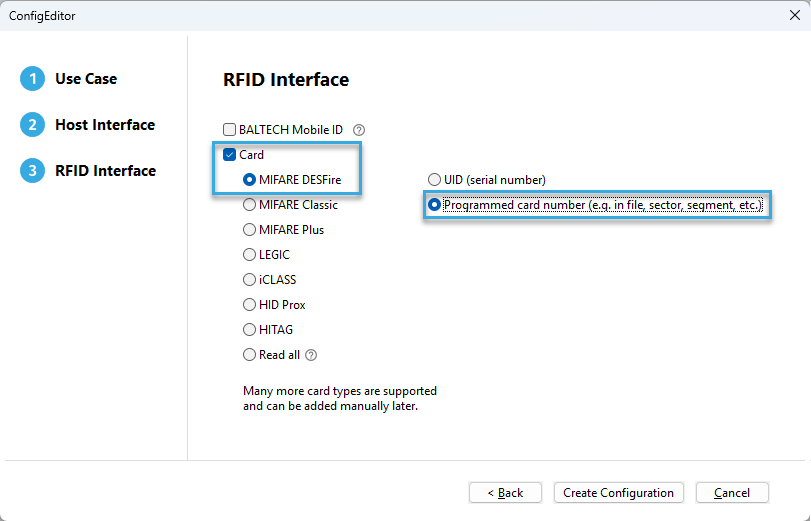
To configure the reader to read the programmed card number (PCN) from an application, we recommend you create a configuration using Autoread Wizard. In the RFID Interface section of the wizard, select MIFARE DESFire and Programmed Card Number.
After finishing the wizard, enter the following values in the configuration component Autoread MIFARE DESFire Number in File.
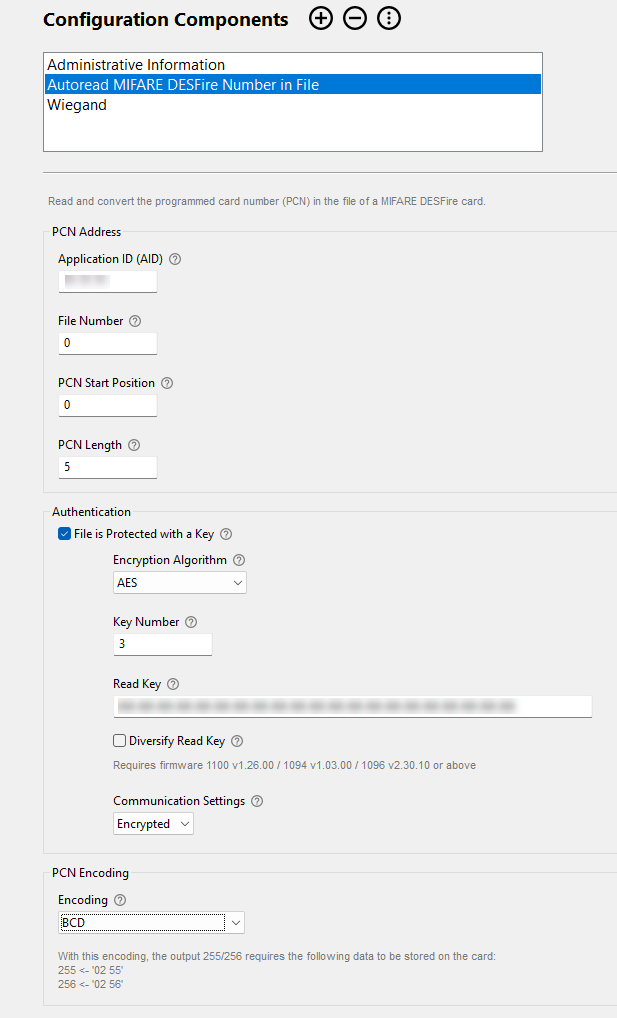
Application 1 – non-diversified keys
| Configuration field | Value |
|---|---|
| Application ID (AID) | Provided by BALTECH |
| File Number | 0 |
| PCN Start Position | 0 |
| PCN Length | 5 |
| File is Protected with a Key | enabled |
| Encryption Algorithm | AES |
| Key Number | 3 |
| Read Key | Provided by BALTECH |
| Diversify Read Key | disabled |
| Communication Settings | Encrypted |
| PCN Encoding | BCD |
Alternative files
Files 1–4 in this application contain the same PCN but are protected by separate key pairs (Keys 5–12), allowing different systems or users to read the same card independently. Adjust the file number and key number accordingly.
Application 2 – diversified keys
Use the same values as for Application 1 above, with one difference:
| Configuration field | Value |
|---|---|
| Key | Provided by BALTECH (diversification master key) |
| Diversify Ready Key | enabled |
| Diversification Data Input | Provided by BALTECH |
Key diversification (NXP AN10922) generates a unique per-card key derived from the master key and the card's UID.